
By type of site
The short answer, by type of site
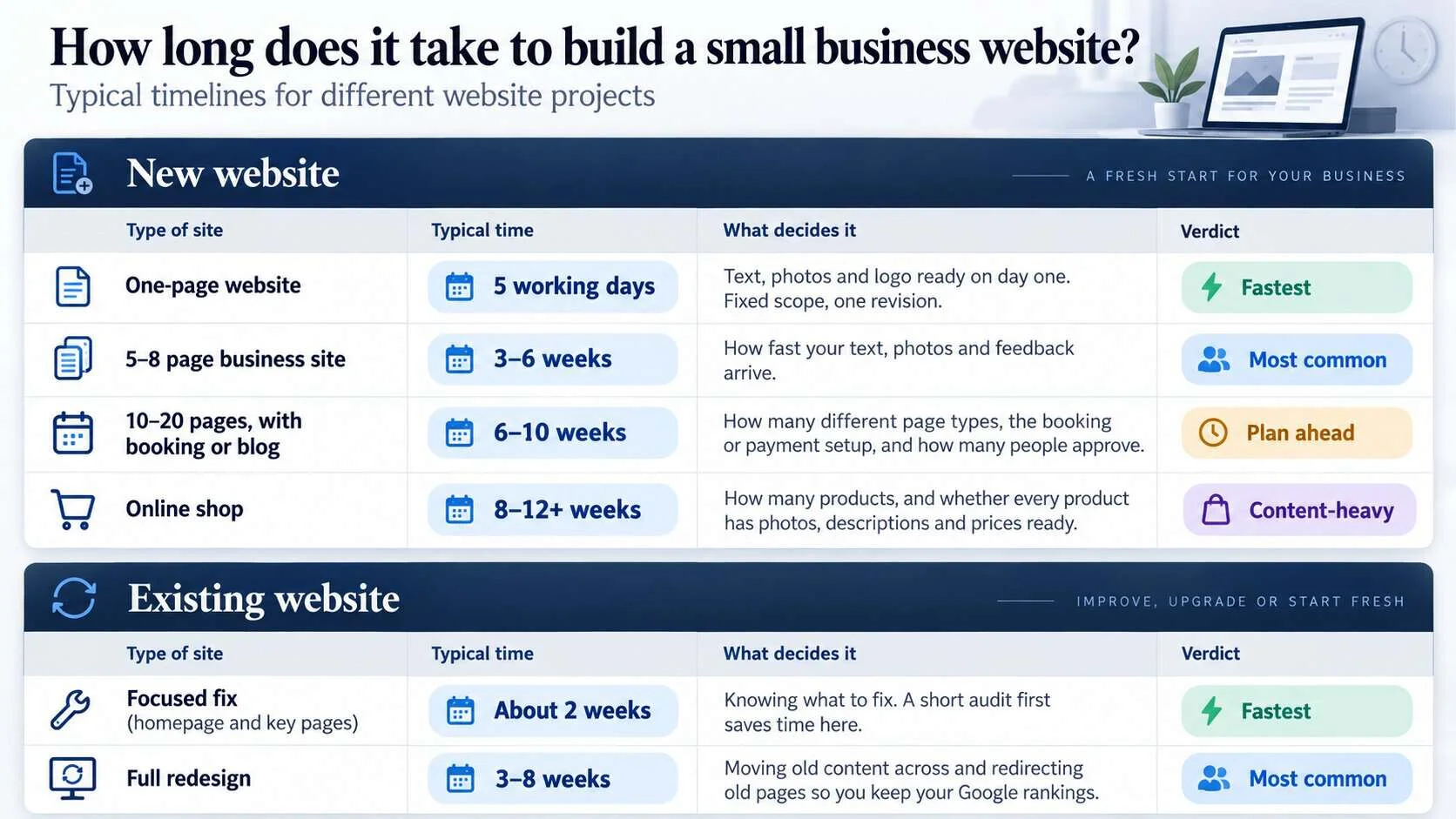
These are the times I see on real small business projects, counted from the day work starts to the day the site goes live. They assume the owner replies within a few days. If content is late, add the delay on top.
Show this as a table
| Type of site | Typical time | What decides it | Verdict |
|---|---|---|---|
| New website | |||
| One-page website | 5working days | Text, photos and logo ready on day one. Fixed scope, one revision. | Fastest |
| 5–8 page business site | 3–6weeks | How fast your text, photos and feedback arrive. | Most common |
| 10–20 pages, with booking or blog | 6–10weeks | How many different page types, the booking or payment setup, and how many people approve. | Plan ahead |
| Online shop | 8–12+weeks | How many products, and whether every product has photos, descriptions and prices ready. | Content-heavy |
| Existing website | |||
| Focused fix (homepage and key pages) | About 2weeks | Knowing what to fix. A short audit first saves time here. | Fastest |
| Full redesign | 3–8weeks | Moving old content across and redirecting old pages so you keep your Google rankings. | Most common |
The prices for each of these are in what a website costs in Malaysia. Time and price move together: a quote that is much cheaper usually means less time spent on your content.
Week by week
A 5-page website, week by week
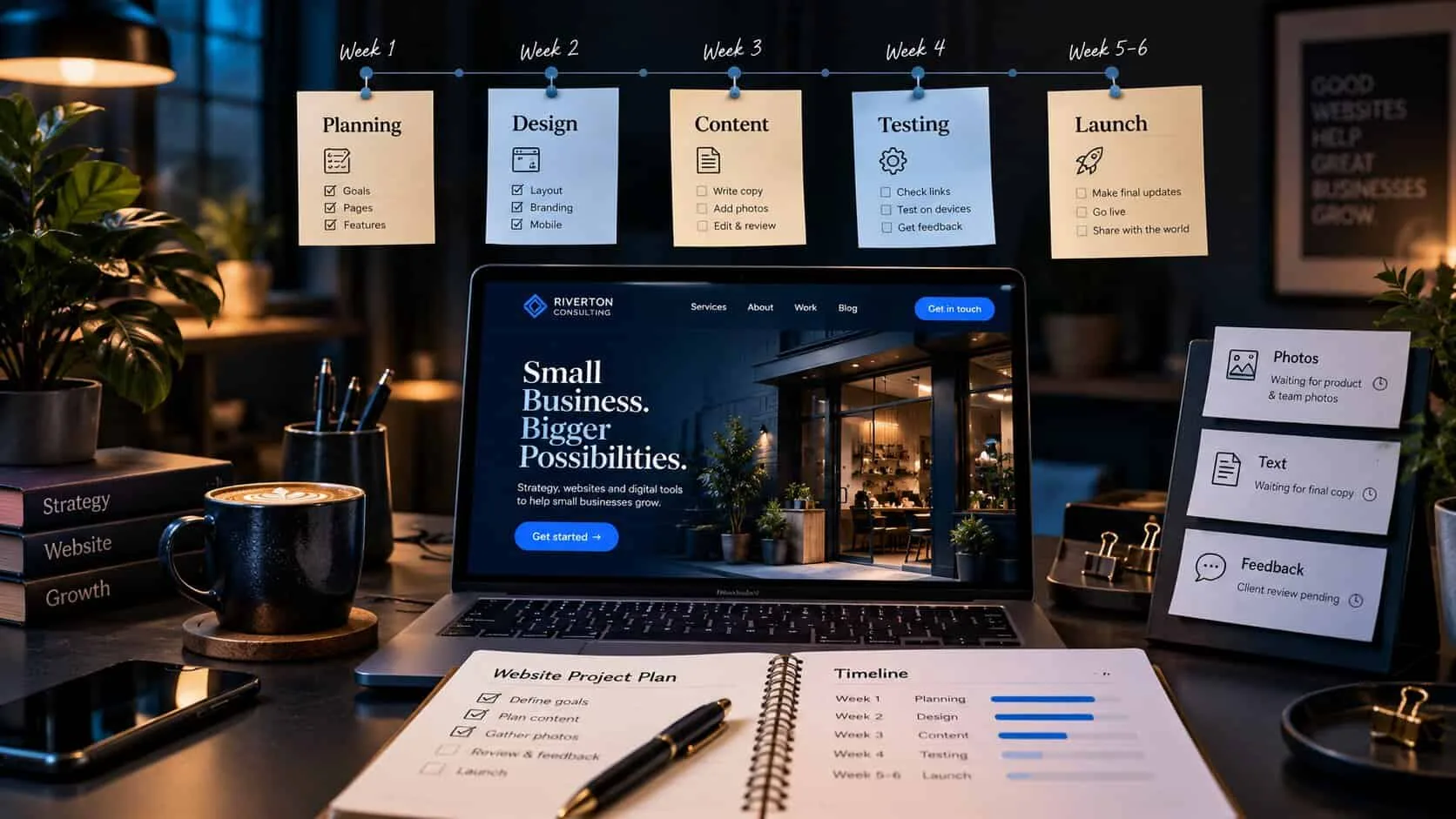
This is a typical six-week project for a 5-page service business site. Each week shows what the designer does and what you need to supply. When your part arrives late, the whole plan moves.
- 1
Week 1
Brief and plan
Agree the site’s one job, the pages, and who supplies what by when. The designer maps every page before any design starts.
You supply: your four answers, logins, examples you like.
- 2
Week 2
Content
Text is written or edited from your notes, photos are chosen, prices and service details are confirmed.
You supply: service details, prices, photos, reviews.
- 3
Week 3
Design
The homepage and one inner page are designed first, on phone and desktop. You give one round of feedback on both.
You supply: one combined list of feedback, within two working days.
- 4
Week 4
Build
The rest of the pages are built from the approved design. Forms, WhatsApp buttons and tracking are set up.
You supply: nothing new, ideally. This is the designer’s week.
- 5
Week 5
Review and test
You check every page on your own phone. Forms are tested, speed is checked, and old pages get redirects.
You supply: a final list of fixes, and a yes to launch.
- 6
Week 6
Launch
The site goes live, is submitted to Google Search Console, and is checked again a few days later.
You supply: a quick check that enquiries arrive in your inbox.
Delays
What slows a website project down
Almost every late project I have seen was waiting for one of these. None of them is about the designer’s skill.
Content arrives late
Text and photos are needed before design can finish. A site waiting on “I’ll write the About page this weekend” can wait for months.
Too many people approving
Every extra person adds a round of opinions. Feedback from a partner, a manager and a cousin often disagrees and has to be sorted out first.
Feedback in pieces
Ten separate WhatsApp messages over two weeks are slower than one list sent in two days. Each new message restarts the work.
Logins nobody can find
A domain registered by an old designer or a former staff member can hold up launch for weeks. Check you can log in before work starts.
The scope grows halfway
“Can we also add a shop?” in week four means planning again. Write new ideas down for phase two instead.
Waiting for a photo shoot
Booking a photographer after design starts is a common delay. Book early, or launch with good phone photos and replace them later.
What good looks like
How to launch sooner
You can’t make a designer build faster, but you control most of what decides the date.
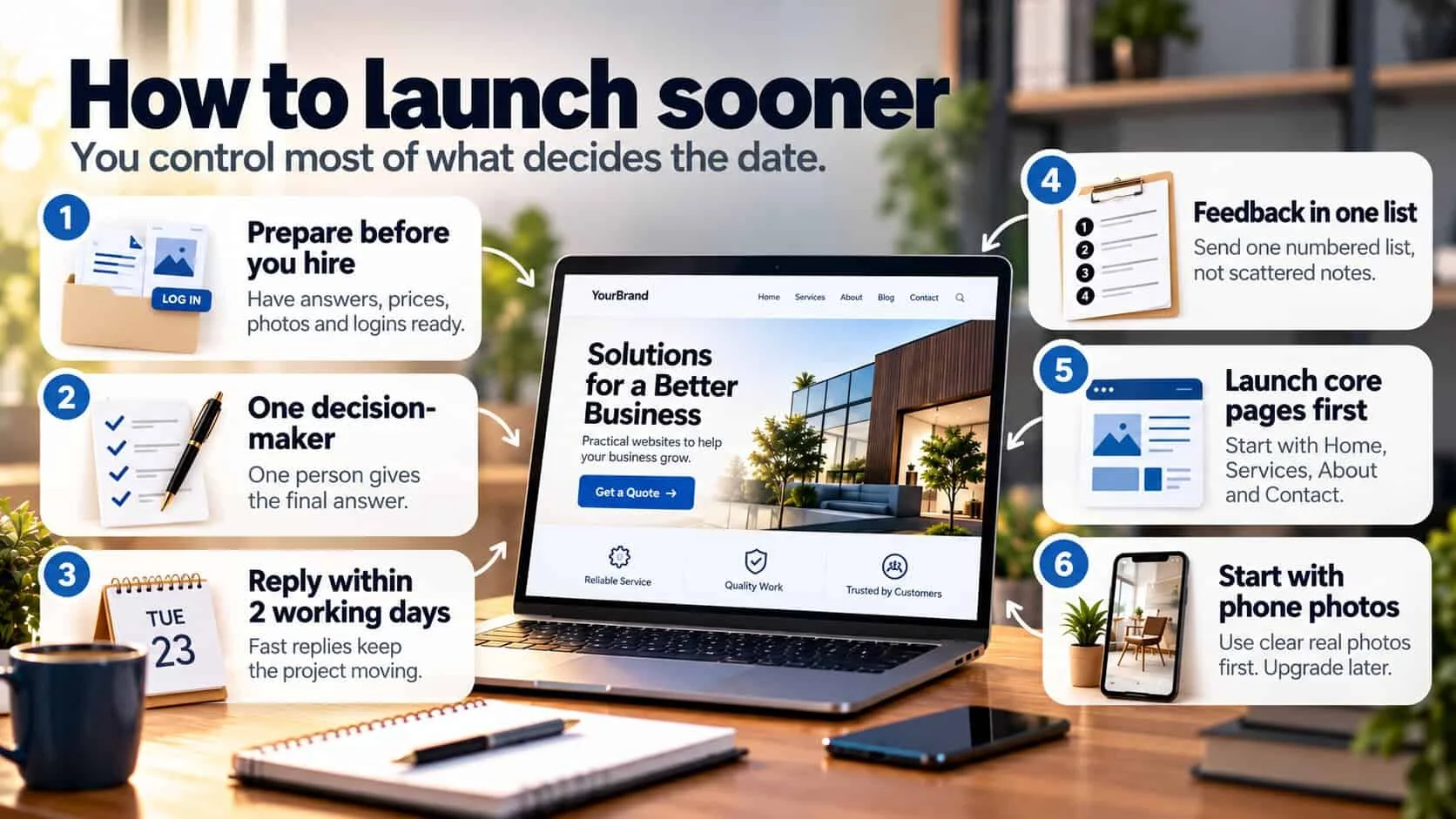
Prepare before you hire
Answers, prices, photos and logins ready on day one. Here is the full list.
One decision-maker
One person collects everyone’s opinions and gives the designer a single answer and the final yes.
Reply within two working days
Agree this as a rule. Fast replies keep the designer on your project instead of moving to the next one.
Feedback in one list
Go through the whole page, then send one numbered list. It is faster for both of you.
Launch the core pages first
Homepage, services, about and contact are enough to start getting enquiries. Add the blog and extra pages after launch.
Start with phone photos
Good daylight phone photos of real work are fine for launch. Swap in professional photos when they are ready.
Warnings
When a timeline is a red flag
A timeline in a quote tells you how the designer plans to work. Both of these should make you ask more questions.
A full website in two or three days
For a 5–8 page site, this usually means a ready-made template with your logo and colours added. There is no time to plan pages, work on your text or test on phones.
No dates anywhere
“It depends” or “a few weeks” with no milestones means nobody is planning the project. Ask for dates for each stage before you pay a deposit.
Dates only for the designer
A good plan also says when your content is due. Without it, the designer can blame you for every delay.
Months for a small site
Three months for five pages, with your content ready, usually means your project is waiting behind bigger clients.
There are more warning signs to check in the ten red flags in a web design quote.
In writing
What to agree in writing
Before you pay a deposit, ask for these five things in the quote or in a short email. They take ten minutes to agree and prevent most arguments later.
Stages with dates: plan, content, design, build, review and launch, each with a target date.
Your deadlines: what you supply, and by when — text, photos, logins, feedback.
Feedback rounds: how many rounds are included at each stage, and how fast each side replies.
If content is late: the launch date moves by the same amount. No penalties either way, just clear rules.
What “launched” means: live on your domain, forms tested, submitted to Google, and the logins handed to you.
If you are still comparing designers, add these to the seven questions to ask on the first call.
Quick check: will your project launch on time?
5 questions · 30 secondsAnswer honestly. Each “no” is a common reason a project runs late.
FAQ
Questions about website timelines
About five working days, if your text, photos and logo are ready on day one. Most of the time goes into writing and checking the page, not building it. See the five-day One-Page Launch.
A one-page site, yes. A 5–8 page site can be built in two weeks when all the content is ready and one person gives feedback quickly. A full site promised in two or three days is usually a template with your logo added.
Two weeks for a focused fix of the homepage and key pages. Three to eight weeks for a full redesign, because old pages need redirects so you keep your Google rankings. Redesign or rebuild? How to tell.
Usually the project is waiting for something: text, photos, a login or a decision. Ask your designer for a written list of what is outstanding and who owns each item. Most delays are fixed in a week once that list exists.
Google usually finds a new site within a few days to two weeks, faster if it is submitted in Search Console. Ranking well for competitive searches takes months, not weeks. What to check if it doesn’t appear.
Keep reading
Buying a small business website
The full guide
How to buy a small business website
The four decisions to make before you ask anyone for a price.

Checklist
What to prepare before hiring a web designer
Everything to have ready on day one, so the project doesn’t wait on you.

Quotes
10 red flags in a web design quote
What a fair quote must name, including the dates.