

The reasons
Why owners hide their prices
I hear the same four reasons every time. Each one sounds sensible from inside the business. From the customer’s side, each one backfires.
“Competitors will see them”
They can already get your price by asking for a quote. Hiding it stops customers, not competitors.
“Every job is different”
True, but most jobs fall in a range you already know. Customers only need that range to decide whether to talk to you.
“It will scare people off”
The people a price scares off were never going to buy. Without one, they still call, and you spend time on a quote that goes nowhere.
“I want them to call first”
Most people won’t call a business just to find out if they can afford it. They contact the one that already told them.
If you’re worried about looking expensive, a price doesn’t fix that on its own. What fixes it is showing what the price includes. More on that below.
The cost
What hiding the price costs you
When a visitor can’t find a price, they don’t think “I’ll ask”. They fill the gap themselves, and usually with a bigger number than yours.

Then they do one of three things. They leave and find a competitor who shows a price. They send a one-line “how much?” message and never reply to your answer. Or they call, ask the price straight away, and hang up. Either way you have done the work of a quote without getting the job.
Showing a price does the opposite. The people who contact you already know roughly what it costs. Your first conversation is about the job, not about whether they can afford you. If enquiries have dried up and you don’t know why, missing prices are one of the first things I check: see why your website isn’t converting.
The options
Five ways to show a price when every job is different
You don’t need a fixed price list. Pick the one that fits how you actually quote. Examples are illustrations, not market prices.
| Method | Example | Best for | Verdict |
|---|---|---|---|
| Fixed price | “Aircond chemical wash: RM 150 per unit.” | Standard jobs that cost the same every time | Clearest |
| Starting from | “Kitchen repaint from RM 1,200.” | Jobs with a known minimum that grow with size | Most common |
| Typical range | “Most bathroom renovations cost RM 8,000–15,000.” | Custom work where the range is honest and useful | Good |
| Packages | Basic, Standard and Full, each with a price and what’s included | Services you can bundle, like care plans or photo shoots | Good |
| Real examples | “Last month: 3-room office rewire, RM 4,800, two days.” | One-off projects where no two quotes look alike | Good |
| “Price on request” | “Contact us for pricing.” | Almost never | Avoid |
Whichever you choose, add one line on what changes the price: size, materials, location, urgency. It makes even a wide range feel fair, and it answers the next question before it is asked.
The exceptions
When not to show prices
A few businesses really can’t publish a number. Even then, say something useful.
Tenders and large B2B contracts
Prices depend on a spec the buyer writes. Show past project sizes and what drives cost instead.
Prices that change every week
Materials or rates that move with the market. Show a recent example with the date it was quoted.
Rules in your profession
Some professions limit how fees are advertised. Check your body’s rules, then explain how you charge (fixed fee, hourly, by stage).
“We can’t show prices” should be rare. If you quote similar jobs most weeks, you can show a range.
The how
How to write the price section
- 1
Pick one method
Choose from the five above. One per service. Mixing “from” prices and ranges on the same page confuses people.
- 2
Say what’s included
List what the price covers in plain words: visit, materials, clean-up, warranty. This is what makes a price look like value instead of a cost.
- 3
Say what changes it
One or two lines: “Larger rooms, ceiling work or weekend jobs cost more.” Honest, short, and it saves a round of questions.
- 4
Add one real example
A recent job with what it cost and how long it took. One example builds more trust than any amount of “competitive rates”.
- ✓
Put the next step right beside it
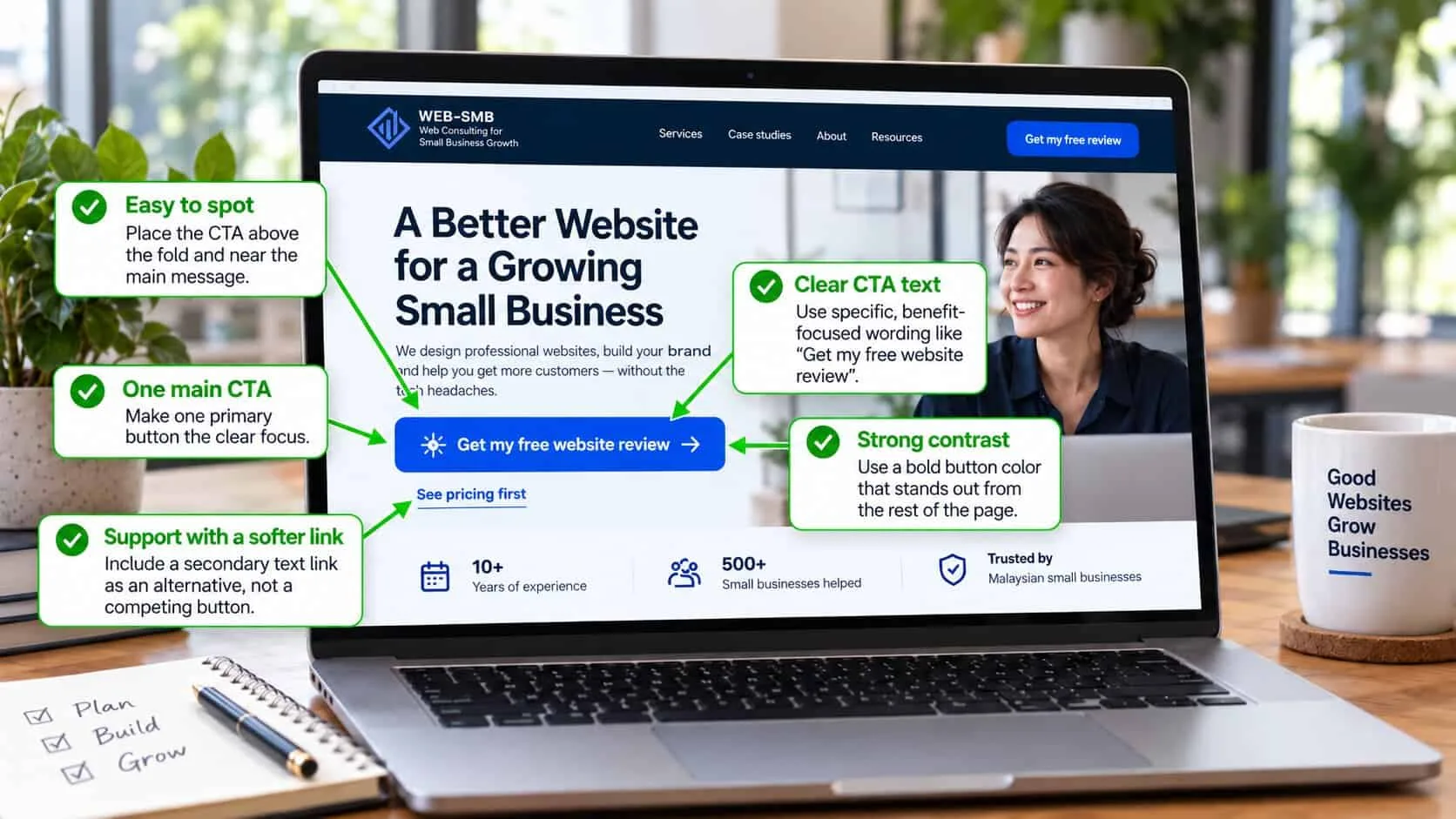
A button to ask for an exact quote, ideally on WhatsApp with the message already filled in. More in calls to action that get clicked.
Then check it on your phone. The price, what’s included and the button should fit on one or two screens.
The placement
Where prices go on your website
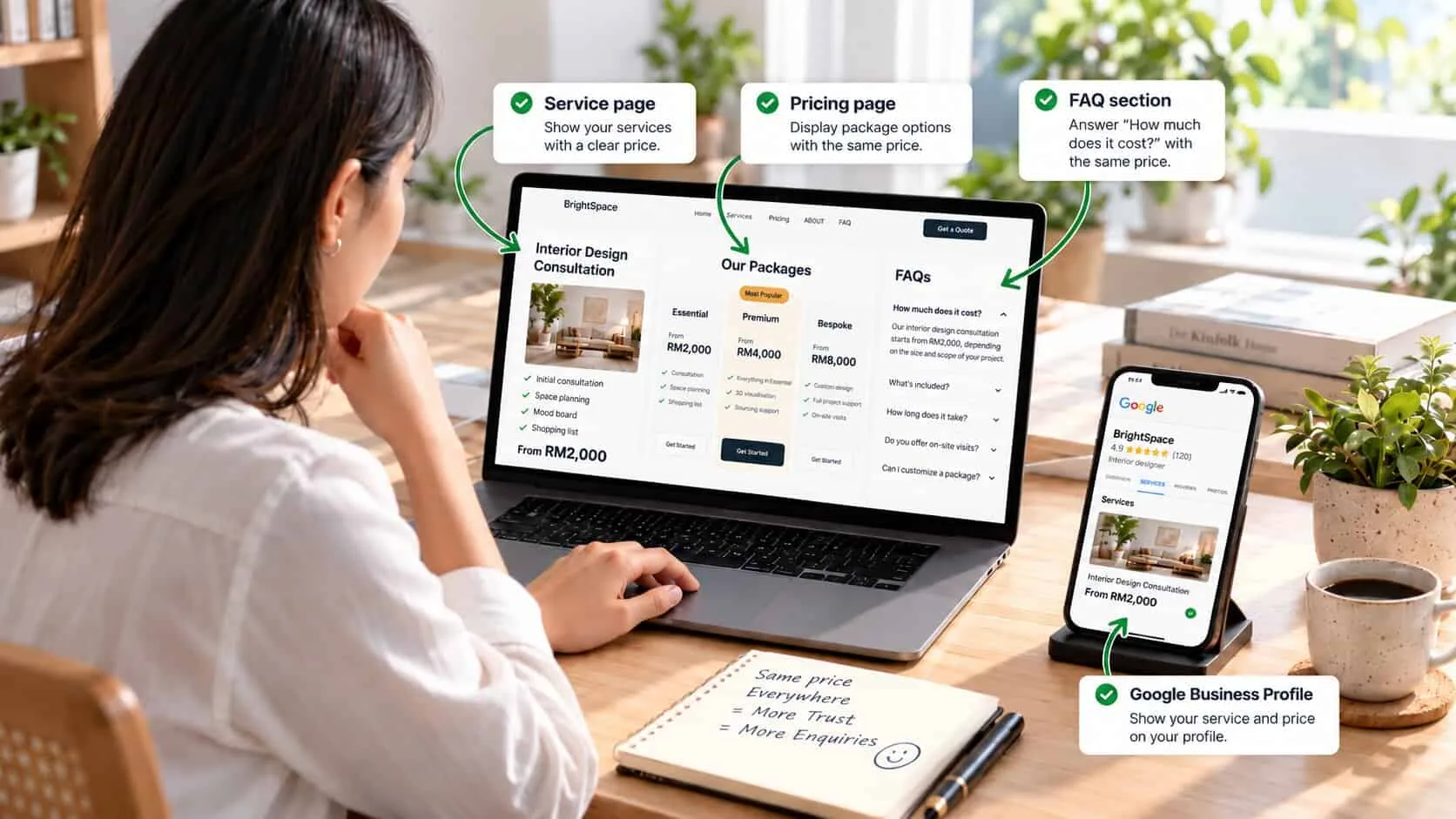
On every service page
Next to what is included, after you explain the job. The full order of a service page is in how to write a service page that converts.
On a pricing page, if you sell packages
Two or three options side by side, with the most popular one marked. Link to it from the menu.
In your FAQ
“How much does it cost?” is the question everyone has. Answer it with the same numbers as the service page.
On your Google Business Profile
Add the same starting prices to your services. Many people decide from Google before they ever open your site.
Keep every price the same everywhere it appears. A different number on Google and on your site makes both look unreliable.
The benchmark
What good looks like
A visitor knows roughly what it costs within ten seconds
Without scrolling far, opening a PDF or sending a message.
The price sits next to what it includes
So the number reads as value, not just as a cost.
There is a clear way to get an exact quote
One button, right beside the price, that opens WhatsApp or a short form.
The prices are dated and kept current
A “prices checked October 2026” line, updated at least once a year.
Prices are one of the strongest signals that you are open and honest. The others are in trust signals that make visitors enquire.
Quick check: are your prices helping or hurting?
5 questions · 30 secondsAnswer for your own website, honestly.
Showing prices: owners’ questions
Should a small business show prices on its website?
Yes, in most cases. Show at least a starting price, a typical range or a few real examples. Visitors who see no price usually assume you are expensive and contact a competitor who does show one.
What if every job is different?
Show what most jobs cost and what makes the price go up or down. “Most kitchen repaints cost RM 1,200–2,000, depending on size and condition” is honest and still useful. You confirm the exact price after seeing the job.
Won’t competitors copy my prices?
They can already get your prices by asking for a quote. Hiding them mainly stops customers, not competitors. Compete on what is included, how fast you reply and your reviews.
Is “price on request” a good idea?
Rarely. It reads as “expensive” and adds a step before the customer learns anything. If you can’t show a number, show a range, a starting price or what affects the cost.
Will showing prices bring fewer enquiries?
You may get fewer enquiries from people who could never afford you, which saves you time. Most businesses find the enquiries they do get are better, and closer to a yes.
Where should prices go on my website?
On each service page, next to what is included, with a button to ask for an exact quote. A separate pricing page helps if you offer packages. Add the same starting prices to your Google Business Profile services.
Keep reading
Turning visitors into enquiries
Service pages
How to write a service page that converts
The seven sections, in order, including where the price goes.

Trust
Trust signals that make visitors enquire
Ten signals, placed where people decide.
Calls to action
Calls to action that get clicked
The button wording, the line beside it, and where it goes.