

Why good visitors abandon the form
By the time someone opens your contact form, the hard part is done. Your homepage or service page has already convinced them. Now they are only deciding if contacting you is worth the effort — usually on a phone, often in a spare five minutes.
Every extra field, unclear label or puzzle makes it a little harder, right when they have the least patience. Nobody fills in twelve boxes to ask a question they could send in one WhatsApp message. They close the page, plan to come back, and call someone who made it easier.
When I review sites that get visitors but no enquiries, the form is rarely the only problem. But it is the cheapest part to fix, and you see results within weeks.
The four fields worth asking for
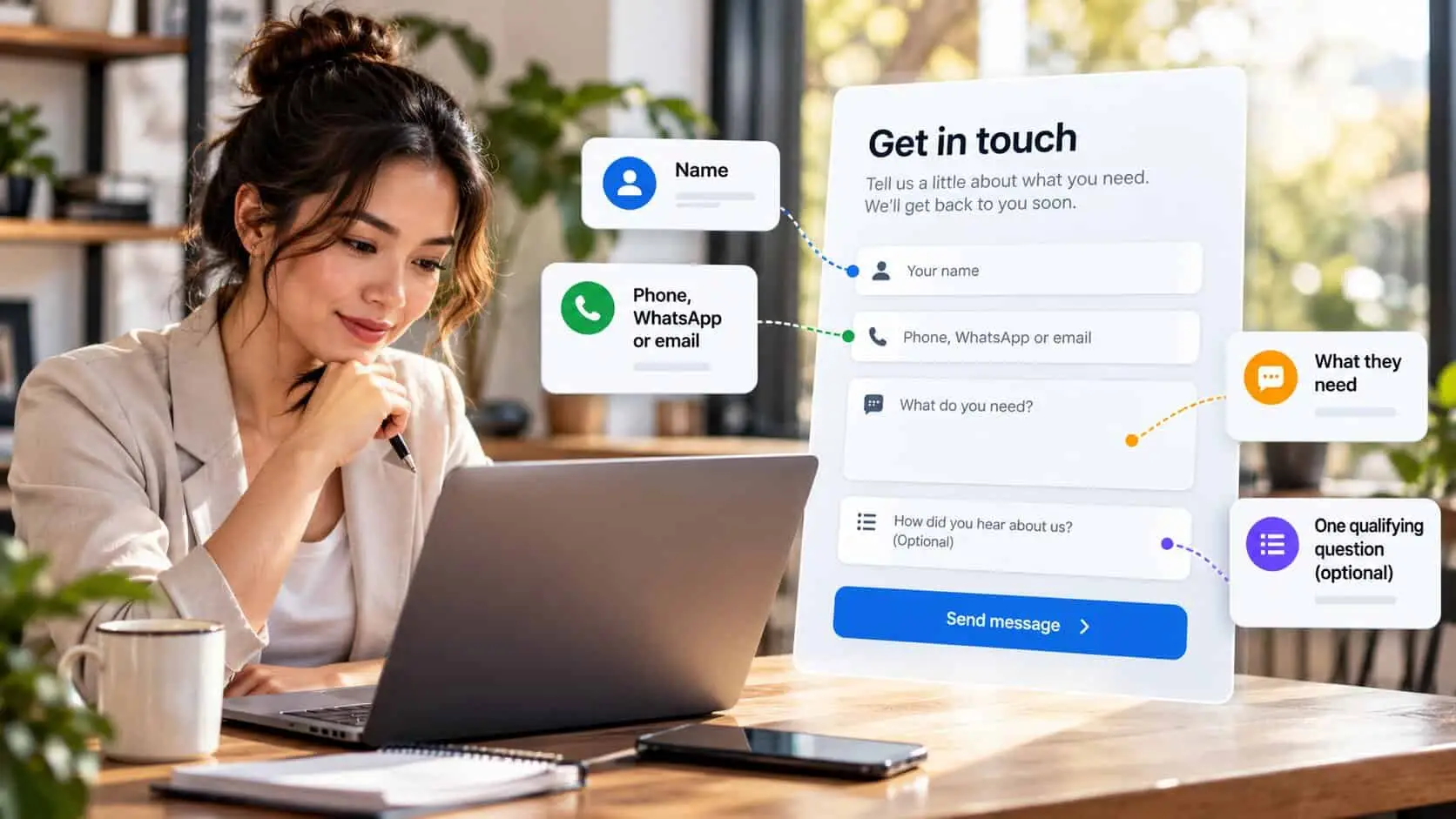
Only ask for what you need to reply. Don’t ask for things you only need after the job is confirmed. For most small businesses that is four things. Everything else can be asked in your reply or on the first phone call.
| Field | When to ask | Why |
|---|---|---|
| Name | Ask now | You need something to call them. |
| Phone, WhatsApp or email | Ask now — one, their choice | Let them pick the channel they’ll actually answer. |
| What they need | Ask now | One open box. A sentence is enough to reply well. |
| One qualifying question | Ask now, optional | Area, rough date or budget band, as a dropdown. |
| Company name | Usually later | Ask only if you sell mainly to businesses. |
| Full address | Later | You need it to quote a visit, not to say hello. |
| Exact budget | Later | Most buyers don’t know yet. A band works better. |
| “How did you hear about us?” | Later, or never | Useful to you, not to them. Ask on the phone. |
Most owners skip the optional question, but it is the most useful one. A dropdown for area, timing or budget (“under RM 2,000”, “RM 2,000–5,000”, “not sure yet”) helps you reply with real details instead of just “thanks, when can we talk?”
Nine fixes, in order of impact
Start from the top. The first three usually make the biggest difference.
Cut the form to four fields
Remove anything in the “later” rows above. If a field is optional, ask yourself if you need it at all. Fewer fields almost always means more people finish the form.
Let them choose how you reply
Offer phone, WhatsApp or email as one choice, not three required boxes. In Malaysia, many customers prefer WhatsApp to email — let them choose.
Say what happens next, right by the button
Add one line: who replies, how fast, and that asking is free with no commitment. “Richerd replies within one working day. No sales call unless you ask for one.” This removes the worry that stops people at the last step.
Name the outcome on the button
“Submit” sounds like work. “Get my quote” or “Send my enquiry” tells them what they get. It is a small change that reminds them why they are filling in the form.
Put labels above the fields
Grey hint text inside the box disappears once someone starts typing, so they forget what the field is for. A short label above each field stays visible and is easier to read on a phone.
Build it for a thumb
Use one column and fields big enough to tap. Make the phone field open the number keypad, and the email field open the email keyboard. Most enquiries come from phones, so test there first.
Drop the puzzle CAPTCHA
“Select all the traffic lights” stops real customers, not just bots. A hidden spam trap or an invisible spam check stops most spam without the visitor doing anything.
Write errors that help
If something is wrong, show which field and how to fix it, right next to that field. Keep everything else they typed. Most people won’t fill in a form twice if it clears after one mistake.
Send them to a real thank-you page
Confirm the message arrived, say again when you’ll reply, and offer one next step — like a case study or your WhatsApp number for urgent questions. A separate thank-you page also lets you count enquiries in Google Analytics.

WhatsApp next to the form, not instead of it
Many Malaysian owners replace the form with only a WhatsApp button. That works for customers who want a quick answer. But it loses people browsing at 11pm, people who want to write out details, and people not ready to share their name and number in a chat.
Offer both, side by side, with the same reply-time promise. Pre-fill the WhatsApp message (“Hi, I’d like a quote for…”) so sending it takes one tap. For more on using it well, see WhatsApp for small business.
Swap these lines
Instead of
“Submit”
Try
“Send my enquiry” or “Get my quote” — name what they get, not what they do.
Instead of
“Please fill in all required fields”
Try
“Just your name, a phone number or email, and what you need. Takes a minute.”
Instead of
“We will get back to you soon”
Try
“I reply within one working day, usually the same afternoon.”
Instead of
“Message (minimum 50 characters)”
Try
“What do you need? A sentence is fine — we’ll ask the rest.”
Test it like a customer, every month
The most costly form problem isn’t bad design. It is a form that has stopped sending. After a plugin update, an expired email password or a new spam filter, enquiries can go nowhere while the page still says “Thank you”. Nobody tells you — the phone just goes quiet.
Once a month, fill in your own form from your phone, on mobile data, like a customer would. Check the email arrives, check it is not in spam, and check the thank-you page shows. Then look at your enquiries in Google Analytics for the month, so you know if the problem is the form or the traffic. If you get many visits but few enquiries, run six checks on your traffic before you change anything else.
Before you publish: a contact form checklist
Every “no” is your next thing to fix. Tap the ones you already have — your ticks are saved on this device.
0 of 10 in place
Tap each one your site already has.
Quick check: is your contact form losing enquiries?
5 questions · 30 secondsOpen your website on your phone, then answer honestly.
Common questions
How many fields should a contact form have?
Three or four for most small businesses: name, how to contact them, what they need, plus one optional question to help you reply. Things you only need after the job is confirmed, like a full address or detailed budget, can wait.
Should I use a contact form or WhatsApp?
Offer both, side by side. In Malaysia many customers prefer WhatsApp to a form, while others prefer email or want to send details at night. Let each choose, and tell both how fast you reply.
Do I need a CAPTCHA on my contact form?
Usually not the puzzle type. Picture and text puzzles stop real customers as well as bots. A hidden spam trap or an invisible check stops most spam without the visitor doing anything.
Why am I getting spam but no real enquiries?
Spam shows the form works. No real enquiries usually means people leave before they reach it, or the form asks too much. Send a test from your own phone, check it arrives, then cut the form to four fields and watch for a month.
What should happen after someone submits a contact form?
Show a thank-you page that confirms the message arrived, says when you will reply, and offers one useful next step. Send yourself a copy of every enquiry, and track the thank-you page in Google Analytics to count enquiries, not just visits.
Part of the website conversion guide — turning the visitors you already have into enquiries.
Keep reading
In this series
Copywriting
How to write a homepage that converts
The five parts of a good homepage, what each one does, and lines you can change this week.
9 min read

Copywriting
How to write a service page that converts
The seven parts every service page needs, how to talk about price, and lines you can copy today.
10 min read
Service pages
Trust signals that make visitors enquire
Ten things that make customers trust you, where to put each one, and what makes them doubt you.
9 min read