Local search is two competitions, not one
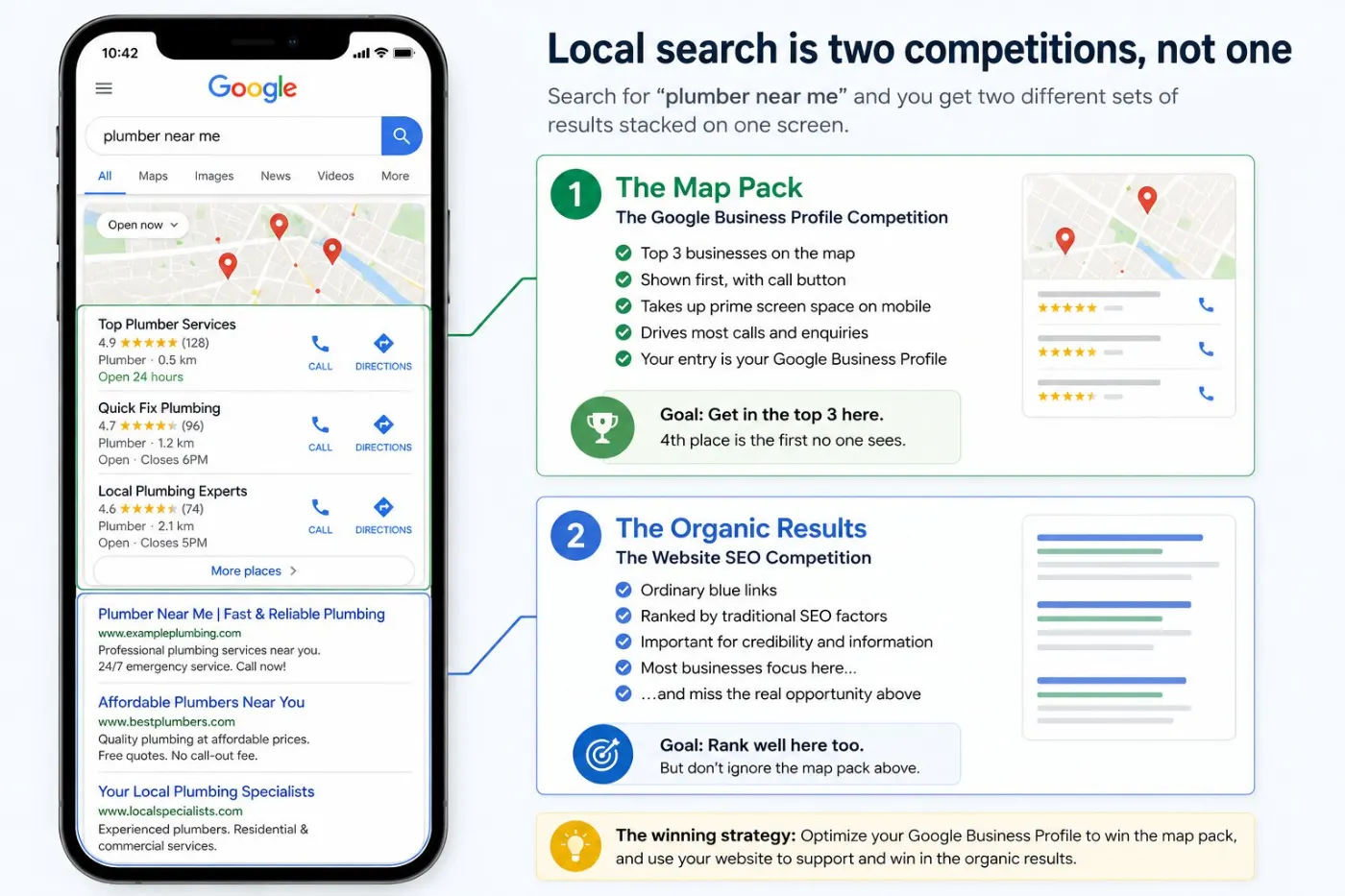
Search “plumber near me” and you see two sets of results on one screen. At the top is a map with three businesses — called the map pack. Below are the normal blue links. They are ranked differently. Most local businesses lose in the map while spending all their effort on the blue links.
The map is where the phone calls come from. It shows first, has a call button, and on a phone it can fill the whole screen. Being fourth on the map — hidden until someone taps “more places” — is almost the same as not being there.
In the map, Google ranks your Google Business Profile, not your website. The website helps (more on that below), but the profile is what gets ranked.
The three things Google is weighing
Google states them plainly, and they are true in practice: relevance, distance and prominence. Almost everything worth doing improves one of them.
Relevance — does your profile match the search?
This depends mostly on your main category, then your other categories, services, and the words in your reviews and description. An aircon specialist listed as “general contractor” makes it harder for Google to match them. This is the cheapest fix on the list, and the one most often wrong.
Distance — where is the person searching?
There is no single ranking. Your position is different on every street. So “am I number one?” has no single answer, and checking from your own shop is misleading — you are standing where you are strongest. You can’t change location, but doing well on the other two helps you show up further away.
Prominence — how well known are you?
The number of reviews and how recent they are, mentions of your business on other websites, links to your site, and how active your listing is. This one is slow, but it keeps growing. That is why businesses that started asking for reviews two years ago seem impossible to beat now.
Setting the profile up properly
Complete profiles rank above incomplete ones, and the difference is bigger than owners expect. Every empty field makes Google guess — or choose someone who filled it in.
Name: exactly what’s on your signage
Not “Chan Plumbing — 24 Hour Emergency Plumber KL”. Names stuffed with keywords sometimes rank for a short time — until a competitor reports them and you lose your listing. Use your real business name.
Primary category: the narrowest accurate one
Choose the category for what you mostly get paid for, not the widest one possible. Then add other categories for the rest of your work. Check what the top three businesses in your area use — anyone can see it, and it shows what Google already sees as a good match.
Address, or service area — not both, and not a fudge
If customers come to you, show your address. If you go to them, set up as a service area business and hide the address. Listing a house or a shared office desk as a shop is the most common reason I see listings suspended, and getting it back takes weeks.
Hours, including the awkward ones
Correct opening hours, plus special hours for public holidays. Showing “open” when you are closed earns a one-star review from someone who drove over. Out-of-date hours also make Google and customers trust you less.
Services and products, written out
List each service separately with a real description, not one line saying “all types of work”. Google reads these, and they help you get found for the exact job someone is searching for.
The description: for humans, read by machines
750 characters. Say what you do, for whom, where, and why choosing you is a safe choice. Write it for a customer to read, not as a list of towns and keywords — Google is much better at spotting that now.
Halfway point
Want to know which of these your listing is failing?
Send me your business name and website link. The free audit compares your profile with your three closest competitors and shows exactly what is missing — categories, reviews, or the website.
Get my free auditRather just ask? WhatsApp me a quick question → No form, no sales call.
Reviews are the lever, and asking is the whole skill
Reviews do two jobs: they move you up the map, and they decide which of the three businesses gets the call. A 5-star profile with six reviews loses to a 4.6 with two hundred, every time.
Almost every small business I work with has the same problem — many happy customers, almost no reviews, because nobody asked. Fix it with a simple routine:
- Ask when the customer is happiest — job done, problem solved, customer smiling. Not a week later by email.
- Send a direct link. Google gives you a short review link in your profile. If customers have to search for you, most won’t bother.
- Ask regularly, a few each week, always. Thirty reviews in one afternoon looks fake.
- Never offer a discount for a review. It breaks Google’s rules, and competitors often report it.
- Reply to all of them, including bad ones — briefly, with facts, without arguing. Future customers read your replies to see how you handle problems.
About the unfair one-star review: leave it and reply well. A profile with no bad reviews looks either new or fake, and a calm reply to an unfair complaint builds more trust than a perfect record.
Photos, posts and the parts owners skip
Photos are the most viewed part of a profile, and the most forgotten. Add real ones: your shop front as seen from the street, so people recognise it; your team; your work, before and after. Skip stock photos — customers can tell, and it makes the business look less real.
Add a few every month instead of forty at once. New photos show Google and customers that your business is active.
Then use the features that suit your business: the Q&A section, where you can answer questions you get on the phone every week; messaging, but only if someone will reply within an hour; booking links; and posts for real news — a new service, seasonal offers, a holiday closure. Posts alone won’t move you up the map, but they fill space that would otherwise be empty.
One more thing to check every month: changes suggested by other people. Anyone can suggest a change to your hours, category or address, and it can go live without telling you. I’ve seen a restaurant marked “permanently closed” by a stranger, and it lost two weeks of bookings before anyone noticed.
Where your website still decides everything
The profile gets the click. The website gets the job. For most searches, people check your website before calling — so a strong listing linking to a weak website just gives people a bad first impression.
Four things on the site do real local work:
- Name, address and phone in the footer of every page, written identically to the profile. Consistency is the point; a different phone number in two places is a contradiction Google has to resolve, usually against you.
- A real page per service you want to be found for, saying where you work. One page listing eleven services ranks for none of them.
- LocalBusiness schema matching the profile exactly — name, address, phone, hours, geo. Invisible to visitors, useful to search engines confirming you’re the same business.
- Speed on a phone, because most of this traffic is mobile and impatient. If that’s your weak spot, start with the speed guide.
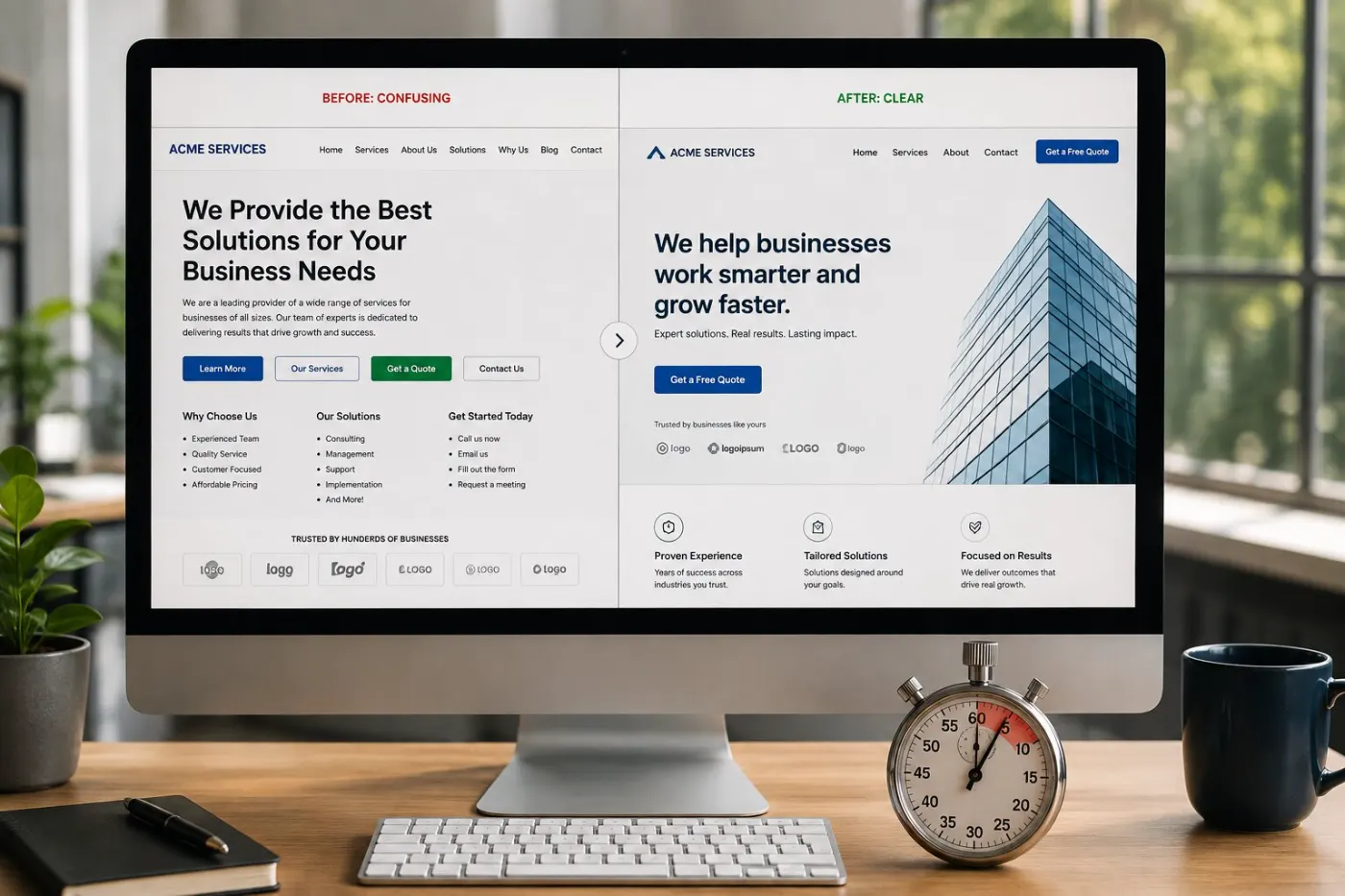
The page you send local searchers to needs what every good page needs: one clear promise, proof, and an obvious next step. That’s covered in how to write a homepage that converts.
The 12-point local SEO checklist
In order of gain per hour spent. The first six are free and can be done this week.
Five mistakes that cost people the listing
Keywords in the business name
Works until someone reports it, then you are stuck trying to get your listing back.
A fake or shared address
Virtual offices and mailbox addresses get caught, and when suspended, you can lose your reviews and ranking too.
Duplicate listings
Often created years ago by a former staff member or an agency. They split your reviews and confuse Google. Find them and combine them.
Bought or traded reviews
Cheap, fast, and easy to catch. Google removes them, and your profile stays under suspicion.
Setting it up once and leaving it
The quietest mistake and the most common. A profile untouched for two years slowly drops below the ones that are looked after.
A realistic first ninety days
Week one: claim and verify, fix the category, fill every field, list the services, set the review link up somewhere you’ll actually reach for it.
Weeks two to four: reply to every existing review, add ten real photos, seed the Q&A, make the site footer match the profile exactly.
Months two and three: a handful of reviews a week, photos monthly, one real service page written properly, and a monthly check for suggested edits.
That’s it. Local SEO for a small business is not complicated — a complete profile, a regular review habit, and a website that matches both. The businesses above you on the map are rarely doing something you can’t. They just started earlier.
Quick check: is your Google Business Profile complete?
5 questions · 30 secondsOpen your website on your phone, then answer honestly.
Questions owners ask
Do I need a website if I have a Google Business Profile?
Yes. The profile gets the click; the website gets the job. People check your website before calling, and Google uses it to confirm what you do and where.
How long does local SEO take to work?
A newly completed profile usually starts moving in two to six weeks. A strong map position for popular searches takes three to six months of regular effort.
How many reviews do I need?
There is no fixed number — you just need to look trustworthy next to the businesses around you. If the top three have fifty each and you have four, that is the gap to close.
Why do I rank at my shop but not across town?
Distance from the person searching is one of the biggest factors, so results change from street to street. More reviews and a better category help you show up further away.
Can I list my home address?
Yes, but if customers can’t visit, set up as a service area business and hide the address. Listing an address customers can’t visit often leads to suspension.
Should I pay someone for local SEO?
You can do the profile work yourself, and it shouldn’t cost much. Pay for the parts that need building — service pages, technical setup, site speed — and be careful of anyone promising a ranking position.